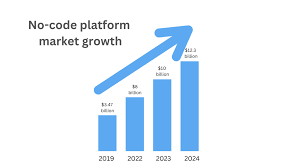
No-code app ideas let you build digital tools and solutions quickly. You use visual interfaces to drag, drop, and connect elements. This makes app creation accessible to everyone, regardless of technical skill.
It’s about turning your vision into a reality with user-friendly platforms.
The Power of No-Code App Development
Think about all the tasks you do each day. Many of them could be made easier with a simple app. Maybe you need a better way to track your houseplants, organize neighborhood book club meetings, or even manage your small business’s customer feedback.
These are perfect candidates for no-code solutions.
The beauty of no-code is its speed. You can build a working prototype in days, not months. This means you can test your ideas quickly.
You can show them to potential users. You can even start selling them sooner. It levels the playing field for entrepreneurs and small businesses.
No-code platforms use visual builders. You drag and drop components. You connect them with logic flows.
It’s like building with digital LEGO bricks. You can create websites, mobile apps, internal tools, and more. The focus shifts from complex syntax to your actual idea and user experience.
Finding Your Perfect No-Code App Idea
The best app ideas often come from real-life problems. What annoys you? What takes too much time?
What could be done better? Listen to your own frustrations and those of people around you.
Talk to friends, family, and colleagues. Ask them about their daily challenges. What tools do they wish they had?
What processes are clunky or inefficient? These conversations are gold mines for app concepts.
Look at existing businesses and services. Is there a part of their operation that seems inefficient? Could a simple app streamline it?
You don’t need to reinvent the wheel. Often, improving a small part of a big process is a great idea.
Consider your hobbies and passions. What tools or systems do you use? Could they be improved?
For example, if you’re a baker, maybe you need an app to track ingredient inventory and expiration dates easily. Or if you love hiking, perhaps an app to log your trails and share them with friends.
Also, think about different industries. Each one has unique needs. Retail, education, healthcare, fitness, travel, event planning – they all present opportunities for specialized apps.
Even within these, there are niches. Think about a yoga studio needing an app for class bookings and member communication.
The key is to find a problem that is specific enough to solve with a focused app. A general app idea is harder to execute and market. A niche app idea can become indispensable to its users.
Let’s explore some categories and specific ideas to get your creative juices flowing.
Category: Personal Productivity & Organization
We all struggle with keeping track of things. These apps help individuals manage their lives better.
Personal Finance Tracker
Many people find budgeting and tracking expenses difficult. An app that simplifies this is always in demand. Users can input income and expenses.
They can categorize spending. The app can show spending habits and savings goals.
User Scenario: Sarah often overspends on dining out. She needs an app that quickly lets her log meals and see how much she has left in her “food” budget for the month. It should be super fast to use.
Habit Builder/Tracker
Building good habits and breaking bad ones is a common goal. An app can provide motivation and accountability. Users set habits they want to track.
They check them off daily. Streaks and progress reports offer encouragement.
LSI Keyword: Goal setting app
Experience: I used a simple habit tracker for my morning routine. Seeing my streak grow made me want to keep going. It really helped me establish consistent habits like reading and meditation.
Digital Journal / Mood Tracker
Mental wellness is important. A private journal app allows users to record thoughts and feelings. Mood tracking over time can reveal patterns.
This can be helpful for self-awareness or sharing with a therapist.
User Scenario: Mark wants to understand his anxiety triggers better. He needs a journal that lets him quickly log his mood and add brief notes about his day when he feels anxious.
Recipe Organizer
For home cooks, managing recipes can be messy. An app can store favorite recipes. Users can add their own.
They can categorize them. Some apps even help create shopping lists from selected recipes.
Related Concept: Meal planning
Task Manager for Specific Projects
Beyond general to-do lists, people need tools for specific projects. Think of wedding planning, home renovations, or starting a new business. An app can break down big tasks into smaller, manageable steps.
It can assign deadlines and track progress.
Quick Scan: Personal Productivity Ideas
Idea: Habit Builder
Why it works: People want self-improvement.
Key Feature: Streaks and reminders.
Idea: Recipe Organizer
Why it works: Home cooking is popular.
Key Feature: Easy recipe input and search.
Idea: Budget Tracker
Why it works: Financial control is a common need.
Key Feature: Simple expense logging.
Category: Community & Social
Connecting people is a powerful use case for apps. These ideas focus on bringing individuals together for shared interests or needs.
Neighborhood Skill Share
Imagine an app where neighbors can offer skills. One person might be great at gardening. Another might be handy with car repairs.
Users list skills they offer and skills they need. It fosters local community and mutual help.
User Scenario: A busy parent needs help assembling a new swing set. They see their neighbor, who is a carpenter, offering assembly services on the app.
LSI Keyword: Local community app
Niche Interest Forum/Group Finder
Many people have very specific hobbies. Finding others who share these interests can be hard. An app could help users find local or online groups for things like vintage comic collecting, rare plant enthusiasts, or specific board games.
Event Organizer for Small Groups
Planning a casual get-together with friends can be surprisingly complex. An app can simplify finding dates, polling for locations, and managing RSVPs for small social events. It’s less formal than a full event planner.
Experience: My friends and I used to spend days coordinating a simple dinner. We finally built a basic app to vote on dates and restaurants. It saved so much back-and-forth!
Pet Playdate Matchmaker
Pet owners often want their animals to socialize. An app could help connect owners of similar pets in the same area for playdates. Users could list their pet’s breed, temperament, and preferred play style.
Related Concept: Pet care
Local Volunteer Opportunity Board
Many people want to volunteer but don’t know where to start. An app could aggregate local volunteer opportunities from various charities and organizations. Users could filter by cause, time commitment, or location.
Contrast: Community App Approaches
Myth: All social apps need a global reach.
Reality: Hyper-local apps can thrive by serving specific neighborhood needs. The focus is on close-knit connections, not mass appeal.
Myth: Community apps are only for young people.
Reality: Older adults also seek connection. Apps focused on shared hobbies or local assistance can be invaluable for seniors.
Category: Small Business & Freelancer Tools
Small businesses and freelancers often need specialized tools that larger companies already have. No-code is perfect for creating these.
Simple CRM for Freelancers
Freelancers need to manage clients, projects, and invoices. A simple Customer Relationship Management (CRM) app can help. It can store client contact info, project details, communication logs, and payment status.
User Scenario: A freelance graphic designer needs to keep track of which clients have paid their invoices and which projects are still in progress. They need a central place to see this quickly.
LSI Keyword: Client management tool
Inventory Tracker for Small Shops
Local shops, craft makers, and even home-based businesses need to know what they have in stock. An inventory app can track items, quantities, and reorder points. It can help prevent running out of popular products or overstocking slow movers.
Appointment Scheduler for Service Providers
If you’re a hairdresser, tutor, consultant, or therapist, an appointment scheduler is crucial. An app can allow clients to book available slots online. It can send reminders to both parties.
This reduces no-shows and saves administrative time.
Experience: My sister runs a small dog grooming business. She built an appointment app using a no-code tool. Her bookings went up, and she spent far less time on the phone confirming appointments.
Customer Feedback Collector
Businesses of all sizes need feedback to improve. An app can be used to collect customer reviews, surveys, or suggestions. It can be simple: “How did we do?” with a rating and a comment box.
Related Concept: Customer satisfaction
Project Proposal Generator
For service-based businesses, creating proposals can be time-consuming. An app could guide users through creating professional proposals. They select services, input client details, and the app generates a formatted document.
Stacked Micro-sections: Business App Value
Efficiency Gain: Automate repetitive tasks like scheduling or data entry.
Improved Customer Service: Offer easier booking or faster feedback loops.
Better Data Insights: Track sales, inventory, or client interactions more effectively.
Professional Present a polished, organized front to clients and customers.
Category: Niche Hobbies & Lifestyle
Passions fuel creativity. Apps can enhance almost any hobby or lifestyle interest.
Plant Care Tracker
For the growing number of plant enthusiasts, remembering watering schedules, light needs, and fertilization can be a challenge. An app can allow users to catalog their plants, set reminders, and track their growth.
User Scenario: Someone with a large indoor jungle of plants needs an app to remind them which plants need water on which day, and what type of light they prefer.
LSI Keyword: Gardening app
Personal Library Cataloger
Book lovers often have large collections. An app can help catalog books, track reading progress, and manage loaned books. Users can add book details, ratings, and notes.
Travel Itinerary Planner
While complex travel apps exist, a simpler version for personal trips is useful. Users can list destinations, planned activities, accommodation details, and important booking references in one accessible place.
Workout Log
Fitness enthusiasts often track their workouts to monitor progress. An app can allow users to log exercises, sets, reps, weights, and duration. This helps them see improvements over time.
Experience: I wanted to increase my weightlifting capacity. I built a simple workout log app to track my lifts. Seeing my numbers go up was a great motivator.
Recipe Ingredient Swap/Substitution Guide
For bakers and cooks with dietary restrictions or missing ingredients, an app that suggests substitutions can be a lifesaver. Users input an ingredient, and the app suggests common swaps.
Related Concept: Dietary needs
Quick-Scan Table: Hobby App Ideas
| Hobby | App Idea | Core Need |
|---|---|---|
| Gardening | Plant Care Tracker | Watering/Light Reminders |
| Reading | Library Cataloger | Track Collection & Progress |
| Fitness | Workout Log | Monitor Exercise Performance |
| Cooking | Ingredient Swaps | Find Recipe Alternatives |
Category: Educational & Learning Tools
Learning can be made more engaging and accessible with the right tools.
Flashcard Creator
Students of all ages can benefit from digital flashcards. An app can allow users to create custom decks for studying vocabulary, facts, or concepts. Spaced repetition can be built in for better retention.
User Scenario: A student studying for a history exam needs to memorize dates and events. They want to create digital flashcards that they can review on their phone.
LSI Keyword: Study aid app
Language Practice Partner Finder
Learning a new language is easier with practice. An app could connect language learners with native speakers or other learners for conversation practice. Users could specify languages and practice goals.
Glossary for Technical Fields
For students or professionals in fields with lots of jargon (like law, medicine, or tech), an app that serves as a searchable glossary is invaluable. Users can quickly look up definitions.
Related Concept: Technical vocabulary
Quiz Generator for Teachers
Teachers could use an app to easily create and distribute quizzes to their students. The app could handle grading and provide quick feedback to both teacher and student.
Experience: My niece’s middle school teacher created a simple quiz app for science class. The kids loved it, and it made reviewing for tests much more fun and effective.
Skill-Based Tutorial Organizer
If someone is learning a new skill like knitting, coding, or playing an instrument, they often collect links to various tutorials. An app could help them organize these links by topic and track their progress through them.
Observation Flow: Learning App Impact
Step 1: Need Identified. Student struggles with memorizing historical dates.
Step 2: Idea: Flashcard App. Create digital cards for quick review.
Step 3: Development (No-Code). Use a drag-and-drop builder to make cards, add decks, and set up review sessions.
Step 4: User Experience. Student accesses app on phone, reviews cards during downtime, sees progress.
Step 5: Outcome. Improved retention and better exam scores.
Category: Health & Wellness
Apps can support healthy habits and personal well-being.
Water Intake Tracker
Staying hydrated is vital. A simple app that lets users log their water intake and reminds them to drink can be very effective. It can track daily goals.
User Scenario: Someone who works at a desk all day often forgets to drink water. They need an app that sends them gentle reminders throughout the day.
Meditation & Mindfulness Timer
While many apps offer guided meditations, a simple timer can be useful for those who prefer silence or their own guidance. It can track session lengths and build a streak.
LSI Keyword: Mindfulness tool
Simple Symptom Tracker
For individuals managing chronic conditions or tracking common ailments, a simple symptom tracker can be useful. Users can log symptoms, severity, and potential triggers. This data can be valuable for doctors.
Related Concept: Health monitoring
Food Diary for Allergies/Intolerances
People with food allergies or intolerances need to be very careful about what they eat. A diary app can help them log meals and note any reactions, making it easier to identify problematic foods.
Experience: My friend has a gluten intolerance. She built a food diary app to quickly log her meals. If she had a reaction, she could see exactly what she ate that day, which helped her pinpoint the cause faster.
Personalized Stretch Routine Planner
For athletes, desk workers, or anyone looking to improve flexibility, an app that helps plan and track stretching routines can be beneficial. Users could select target areas and duration.
Split Insight Panel: Wellness App Benefits
Hydration: Simple reminders for consistent water intake.
Mental Health: Track moods and meditation practice for self-awareness.
Physical Health: Log workouts and symptoms for better management.
Nutrition: Monitor food intake for specific dietary needs.
Category: Utility & Productivity Boosters
These are smaller tools that solve specific, often annoying, problems.
Digital Business Card
In networking situations, a digital business card app is more convenient than paper. It can store contact info and share it easily via QR code or link. It can also be updated instantly.
User Scenario: A salesperson attends many conferences. They want an app that lets them quickly share their professional contact details with leads.
LSI Keyword: Contact sharing app
Receipt Scanner and Organizer
Keep track of expenses for reimbursement or taxes. An app can allow users to snap photos of receipts, add details, and store them digitally, sorted by date or category.
Customizable Checklist Maker
From packing lists to cleaning schedules, checklists are everywhere. An app that lets users create, save, and reuse custom checklists is a handy tool.
Gift Idea Tracker
Never forget a great gift idea again. An app can store ideas for friends and family, noting birthdays, anniversaries, and the gift idea itself. It can even track what has been bought.
Experience: My family uses a shared gift idea app. When someone thinks of a gift for another family member, they add it. It prevents duplicate gifts and ensures everyone gets something they truly want.
Parking Spot Saver
In large parking lots or unfamiliar cities, remembering where you parked can be a pain. An app could use GPS to save your parking spot location with a simple tap.
Related Concept: Navigation aid
Choosing the Right No-Code Platform
There are many excellent no-code platforms available. Some are better for web apps, others for mobile apps, and some for internal tools or databases.
Popular options include:
- Bubble: For complex web applications.
- Adalo: For building mobile apps.
- Glide: Creates apps from Google Sheets.
- Webflow: For visually stunning websites.
- Airtable: A powerful database and spreadsheet hybrid.
- Appy Pie: A more general app builder.
Your choice will depend on the type of app you want to build and your budget. Most platforms offer free trials so you can experiment.
What This Means for You
Having an app idea is no longer just for tech wizards. The no-code movement means you can build it yourself.
When it’s normal: It’s normal to feel excited about the possibilities. It’s normal to start small with a simple idea. Many successful apps began as basic tools to solve a single problem.
When to worry: Don’t worry if your first attempt isn’t perfect. No-code platforms have a learning curve. Worry if you get discouraged and give up too soon.
Persistence is key.
Simple checks: Before you dive in, ask yourself:
- Does this app solve a real problem?
- Is the problem significant enough that people would use a solution?
- Can I clearly describe what my app does in one sentence?
If you can answer yes to these, you’re on the right track.
Quick Fixes & Tips for Your No-Code Journey
Starting your no-code journey is an adventure. Here are a few tips to help you:
- Start simple. Don’t try to build Facebook on your first try. Focus on the core functionality.
- Watch tutorials. Most platforms have extensive video libraries.
- Join communities. Forums and social media groups are great for getting help.
- Test early and often. Get feedback from friends.
- Iterate. Your first version won’t be your last. Improve based on feedback.
Frequently Asked Questions
Can I really build a professional app without coding?
Yes, absolutely! No-code platforms use visual interfaces. You drag and drop elements and set up logic.
Many complex apps are built this way. They look and function like traditionally coded apps.
What kind of apps are best for no-code?
Apps that solve specific problems are ideal. Think productivity tools, community platforms, small business aids, or hobby organizers. Highly complex games or apps requiring intense AI might still need traditional coding.
Is it expensive to use no-code platforms?
Many platforms offer free plans or generous free trials. Paid plans are often tiered based on features or usage. For most individuals and small businesses, the cost is very affordable compared to hiring developers.
How long does it take to build a no-code app?
This varies greatly. A simple app might take a few days or a week. A more complex one could take a few weeks.
It depends on the app’s features and your familiarity with the platform.
Can I make money with my no-code app idea?
Yes! You can charge for subscriptions, offer in-app purchases, or use it to support an existing business. Many successful startups have been built using no-code tools.
What if my app idea is very unique?
Explore platforms that offer a lot of flexibility, like Bubble. Even unique ideas can often be built by combining different features and logic. Don’t be afraid to get creative with the tools.
Conclusion
Your next great app idea is likely waiting to be discovered. By focusing on real problems and leveraging the power of no-code tools, you can bring your vision to life. Start exploring, start building, and see what amazing things you can create without writing a single line of code!